Before you begin
You need:- An Entelligence workspace administrator
- A dedicated Bitbucket Cloud service account
- Membership in the intended Bitbucket workspace
- Access to the pilot repositories
- Permission to create a scoped Atlassian API token
- Approval for Entelligence to create or manage the required webhooks
Create the service account
- Create or designate a Bitbucket Cloud account used only for Entelligence.
- Use a dedicated email address and a recognizable display name.
- Apply the workspace’s two-step-verification policy.
- Grant Write access to the target repositories.
- Grant administrative permissions only where the Entelligence installation requires them for repository, project, or webhook management.
- Record the credential owner and offboarding process.
Create a scoped Atlassian API token
- Sign in to the Atlassian account for the service user.
- Open Atlassian API tokens.
- Select Create API token with scopes.
- Name the token, set an expiry, and choose Bitbucket as the product.
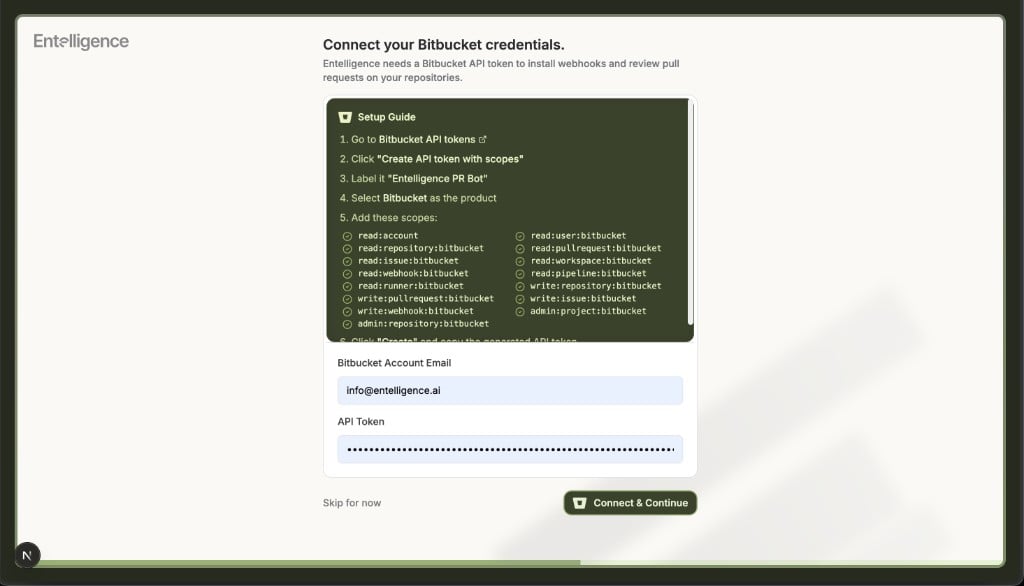
- Select the scopes shown by the current Entelligence onboarding screen.
- Create the token and copy it once into an approved secret manager.
Atlassian documents that Bitbucket API-token scopes do not automatically imply one another. Review every requested read, write, and admin permission before creating the token.
Connect the token in Entelligence
Use the deployment-specific Bitbucket onboarding screen:- Open Connect your Bitbucket credentials.
- Enter the service account’s Atlassian account email.
- Paste the scoped API token.
- Select Connect & Continue.
- Confirm a successful connection before choosing repositories.
Install on pilot repositories
- Continue to the Bitbucket workspace and repository selection step supplied by Entelligence.
- Select only the pilot repositories.
- Confirm installation.
- Verify that the required repository or project webhook is created.
- Open a non-draft test pull request.
- Confirm the Entelligence service account posts the configured review.
Network and webhook requirements
If the organization allowlists network traffic, request the current Entelligence egress or callback requirements from support@entelligence.ai. Do not reuse another deployment’s IP list or webhook URL.Verify
- The onboarding screen accepts the service-account email and token.
- Only intended workspaces and repositories are visible.
- The expected webhook exists at the repository or project level.
- A new pilot pull request is detected.
- Reviews are attributed to the dedicated service account.
- An out-of-scope repository is unavailable.
- Revoking the token stops future access.
Rotate or replace the service account
- Create a replacement token or approved replacement service account.
- Update the deployment-specific Entelligence Bitbucket connection.
- Reconnect or reinstall affected pilot repositories when required.
- Verify one test pull request.
- Remove stale webhooks only after the replacement is working.
- Revoke the old token and remove obsolete repository access.
Troubleshooting
For additional help, contact support@entelligence.ai with the workspace, repository, redacted error, and timestamp. Never send the API token.