Current documented components
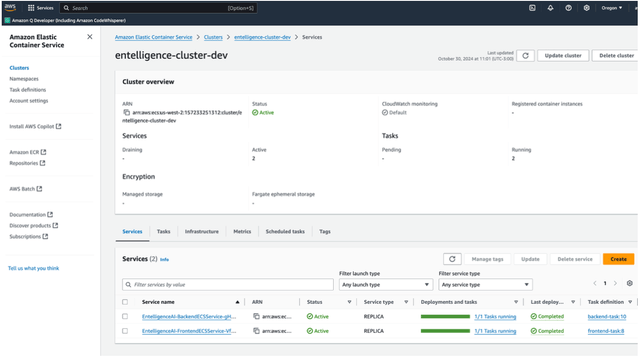
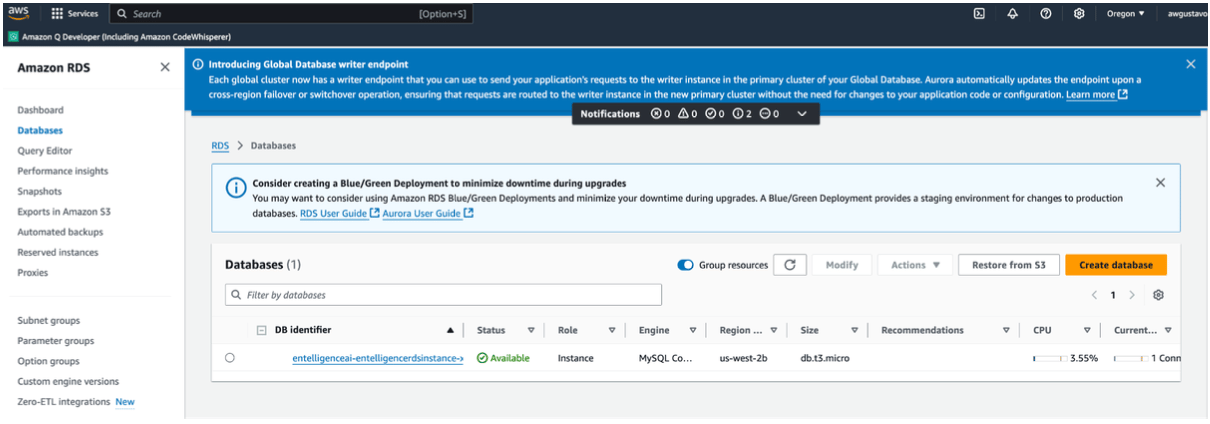
The Entelligence deployment guide currently describes:entelligence-api: backend container imageentelligence-app: frontend container image- A CloudFormation template for the ECS environment and RDS database
- Application Load Balancers for the frontend and backend
- AWS Secrets Manager for generated database credentials
1. Purchase through AWS Marketplace
- Sign in to the approved AWS account.
- Open the Entelligence AWS Marketplace listing.
- Review the seller, legal terms, pricing dimensions, contract duration, user quantity, and refund or cancellation terms.
- Complete the organization’s procurement and AWS Marketplace approval process.
- Select View purchase options or the equivalent current action.
- Create the contract only after the terms and total commercial commitment are approved.
- Continue to configuration and select the current product version and delivery option.
2. Obtain and review the deployment template
Use the CloudFormation template supplied by the current Entelligence Marketplace fulfillment flow or account team. Before launching:- Review the template in source form.
- Inventory IAM roles and policies it creates.
- Confirm supported AWS regions and availability-zone requirements.
- Review VPC, subnet, security-group, load-balancer, ECS, RDS, and Secrets Manager parameters.
- Confirm database engine, sizing, encryption, backup, and deletion policy.
- Confirm container image sources and update ownership.
- Estimate AWS infrastructure cost separately from Marketplace charges.
3. Create the CloudFormation stack
- Open AWS CloudFormation in the approved region.
- Select Create stack → With new resources (standard).
- Use the seller-provided template.
- Enter a descriptive stack name.
- Complete every required parameter using the deployment plan.
- Review tags, stack permissions, failure behavior, and termination protection.
- Acknowledge IAM resource creation only after reviewing the template.
- Submit the stack.
- Monitor Events until the stack reaches a successful completion state.

4. Verify the deployment
Use the actual CloudFormation Outputs, load balancer listeners, and DNS configuration rather than guessed hostnames.Backend
- Locate the backend endpoint from the stack outputs.
- Use the configured
httporhttpsscheme. - Request the documented health path:
/healthCheck/. - Confirm the expected healthy response and target-group status.
- Verify the endpoint is reachable only from approved networks.
Frontend
- Locate the frontend endpoint from the stack outputs.
- Open it from an approved client.
- Confirm it calls the intended backend endpoint.
- Verify authentication, session handling, and logout.
- Confirm no default administrative credential remains.
AWS resources
Verify:- ECS services are stable and tasks use the intended image version.
- Load-balancer target groups are healthy.
- RDS is encrypted, reachable only from approved security groups, and protected by the intended backup policy.
- Database credentials are stored in Secrets Manager and not exposed in stack outputs or logs.
- CloudWatch logs and alarms receive expected data.
- CloudFormation drift is understood before manual resource changes.
5. TLS, DNS, and network controls
- Issue or import certificates through AWS Certificate Manager.
- Configure HTTPS listeners for the Application Load Balancer.
- Create approved Route 53 records or the organization’s DNS equivalent.
- Redirect HTTP to HTTPS where required.
- Restrict inbound security-group rules to approved sources.
- Keep ECS tasks and RDS in the intended private subnets unless the reviewed architecture requires otherwise.
- Document proxy, egress, webhook, and allowlist requirements.
6. Operate the deployment
Monitoring and scaling
- Configure CloudWatch logs, metrics, dashboards, and alarms.
- Establish CPU, memory, latency, error-rate, and target-health baselines.
- Configure ECS service scaling only after load testing and capacity planning.
- Test alert routing.
Backup and recovery
- Configure RDS automated backups and the approved retention period.
- Test snapshot restore and application recovery.
- Record recovery-time and recovery-point objectives.
- Confirm CloudFormation deletion and database-retention behavior.
Updates
- Obtain supported image versions and release instructions from Entelligence.
- Review task-definition and schema changes.
- Test updates in a non-production environment.
- Use a controlled ECS deployment strategy.
- Keep a documented rollback path.
Cost management
- Track Marketplace charges separately from ECS, RDS, load balancer, NAT, storage, logging, and data-transfer costs.
- Configure AWS Budgets and cost-allocation tags.
- Review idle and overprovisioned resources.
Troubleshooting
For product-specific failures, contact support@entelligence.ai with the Marketplace offer, region, stack ID, template version, redacted error, and timestamp. Do not send secrets.