> ## Documentation Index
> Fetch the complete documentation index at: https://doc.entelligence.ai/llms.txt
> Use this file to discover all available pages before exploring further.
# Observability and incident connectors
> Understand the observability connector catalog and the narrower set of sources supported by Incident Knowledge.
The current **Connectors → Observability** catalog includes Sentry, PagerDuty, Datadog, Axiom, Incident.io, BetterStack, New Relic, Elasticsearch/ELK, Grafana, AWS CloudWatch, Azure Logs, GCP Cloud Logging, and Sumo Logic.
A connector appearing in this catalog does not mean it supports Incident Knowledge source mapping.
## Catalog categories
| Source type | Examples | Possible context |
| ---------------------- | --------------------------------------------- | ------------------------------------------ |
| Error tracking | Sentry | Exceptions, stack traces, recurring errors |
| Incident management | PagerDuty, Incident.io | Incident lifecycle and ownership |
| Observability platform | Datadog, New Relic, Grafana | Logs, traces, metrics, and alerts |
| Log platform | Axiom, BetterStack, ELK, Sumo Logic | Detection and log evidence |
| Cloud logging | AWS CloudWatch, Azure Logs, GCP Cloud Logging | Provider-native production telemetry |
The exact data, credentials, and product consumers differ by connector. Review the connector's current setup screen before granting access.
## Incident Knowledge support
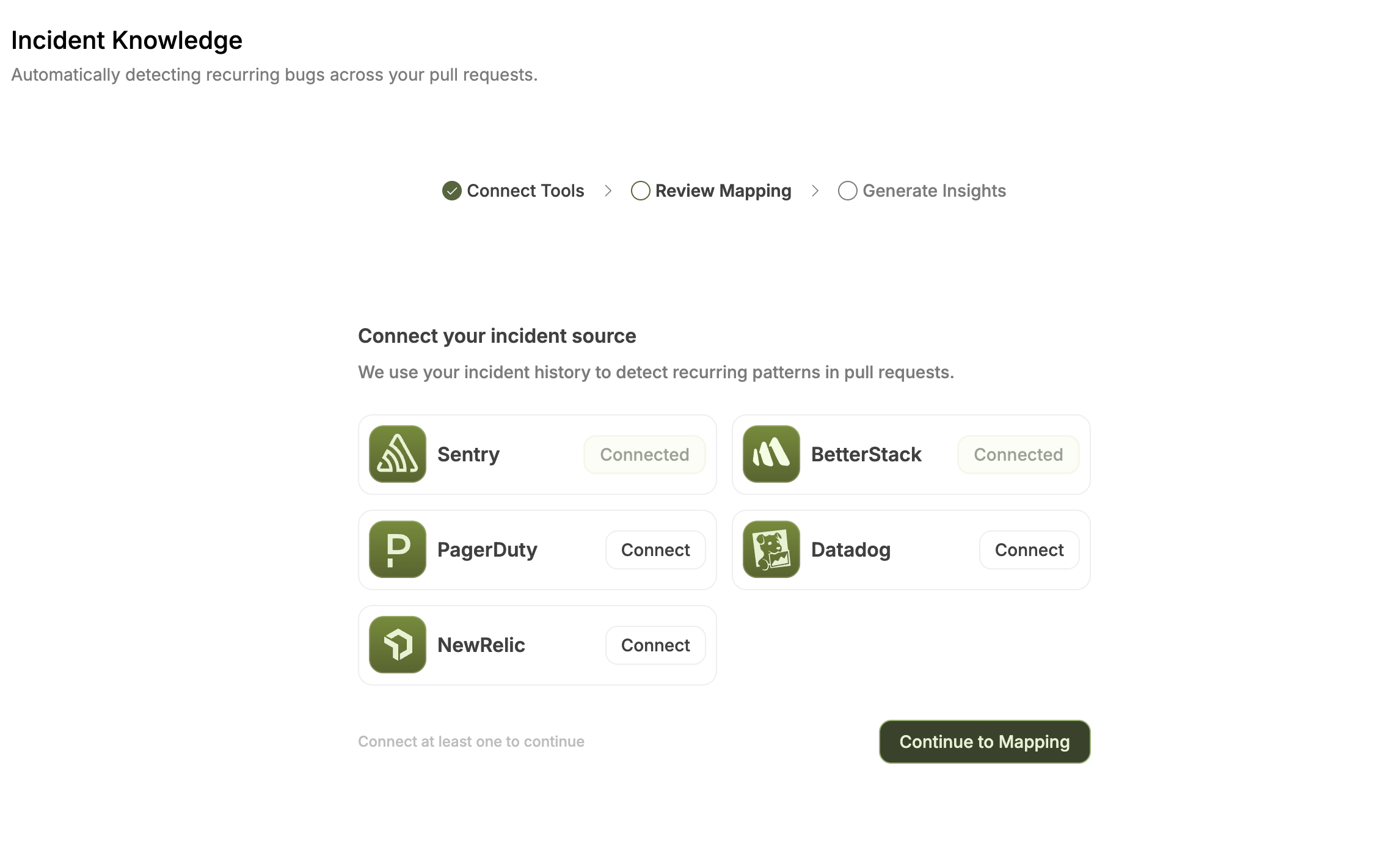
The current Incident Knowledge guide documents these sources:
| Source | Credential described by the current guide | Source-to-repository mapping |
| ----------- | --------------------------------------------------------------------------------------------------------------- | -------------------------------------------------- |
| Sentry | Project auth token | Yes, by project |
| Datadog | API key and application key | Yes, by service or monitor |
| New Relic | Use the credential required by the current Entelligence setup; confirm whether a New Relic user key is required | Yes, by application or entity |
| BetterStack | Personal access token | Yes, by monitor or uptime check |
| PagerDuty | API key | No; incidents are associated with the organization |
Do not assume that Axiom, Incident.io, Grafana, cloud-log, ELK, or Sumo Logic connector availability makes that source usable by Incident Knowledge.
The current Entelligence Incident Knowledge guide describes a New Relic license or ingest key, while New Relic documents license keys for data ingest and a user key for NerdGraph queries. Use the credential requested by the current Entelligence setup and confirm the requirement with Entelligence before granting New Relic access.
## Connect a catalog connector
1. Open **Connectors → Observability**.
2. Select **Connect**, **Configure**, or **View details** as shown.
3. Review the requested credential and scope.
4. Start with the narrowest approved projects, services, indexes, or accounts.
5. Confirm the expected connection state.
6. Run a read-only comparison with the source system.
## Configure Incident Knowledge
1. Open **Code Reliability → Incident Knowledge**.
2. If the feature is available but not configured, select **Setup Incident Tracking**.
3. Choose one of the currently documented Incident Knowledge sources.
4. Enter the credential required by that source.
5. Continue to mapping.
6. Map supported named sources to repositories; leave irrelevant sources unmapped.
7. Confirm the mapping to start ingestion.
 For exact mapping and ingestion behavior, use the [incident-source setup guide](/incident-knowledge).
## Data hygiene
Production logs can contain secrets, tokens, personal data, or customer payloads. Redact at the source, use the narrowest source scope, and confirm retention and regional policy before connecting.
## Verify
* The connector or Incident Knowledge setup reports the expected connected state.
* Only intended projects, services, monitors, or accounts are visible.
* Supported source-to-repository mappings are correct.
* PagerDuty is not presented as a per-source repository mapping.
* One detection or incident matches source evidence.
* Revocation stops future synchronization.
## Next step
Follow [Code Reliability Incident Knowledge](/code-reliability/incidents).
For exact mapping and ingestion behavior, use the [incident-source setup guide](/incident-knowledge).
## Data hygiene
Production logs can contain secrets, tokens, personal data, or customer payloads. Redact at the source, use the narrowest source scope, and confirm retention and regional policy before connecting.
## Verify
* The connector or Incident Knowledge setup reports the expected connected state.
* Only intended projects, services, monitors, or accounts are visible.
* Supported source-to-repository mappings are correct.
* PagerDuty is not presented as a per-source repository mapping.
* One detection or incident matches source evidence.
* Revocation stops future synchronization.
## Next step
Follow [Code Reliability Incident Knowledge](/code-reliability/incidents).