> ## Documentation Index
> Fetch the complete documentation index at: https://doc.entelligence.ai/llms.txt
> Use this file to discover all available pages before exploring further.
# Integration catalog
> Browse Entelligence connectors for AI tools, communication, support, meetings, documentation, project management, observability, product analytics, and CI/CD.
Connectors make Entelligence useful by providing authorized engineering context or a destination for actions. Availability, plan, and status are shown in [**Connectors**](https://app.entelligence.ai/connectors).
## Connector states
| State | Meaning |
| ------------ | ---------------------------------------------------- |
| Connect | No active connection; start authentication |
| Configure | Connection exists or requires additional setup |
| View details | Inspect requirements or current behavior |
| Connected | Authentication is active |
| Default | Preferred source when several connectors overlap |
| Coming Soon | Visible in the catalog but not currently connectable |
## Connectors available
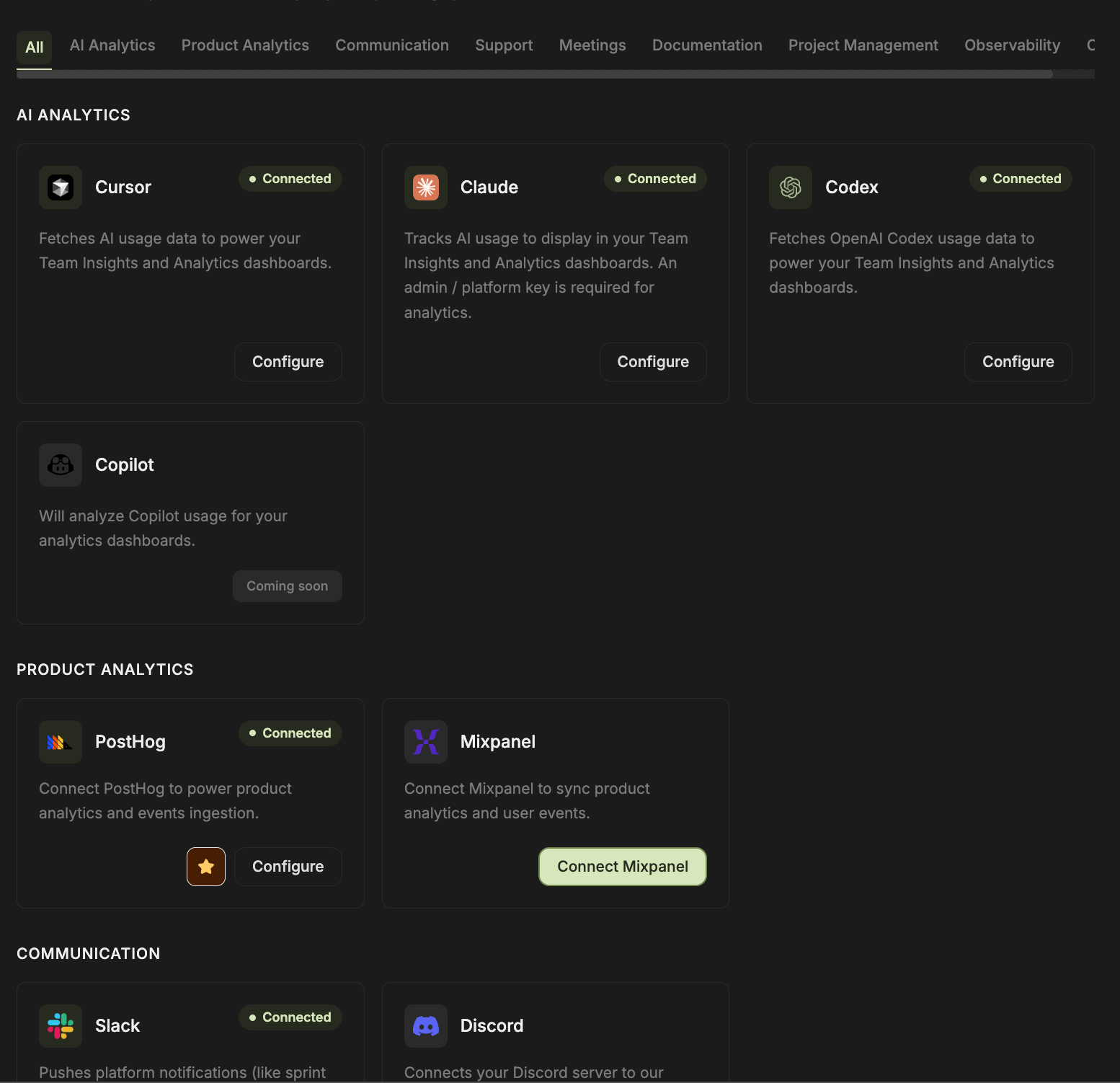 | Category | Available | Coming Soon |
| ------------------ | ------------------------------------------------------------------------------------------------------------------------------------------------------------- | ----------- |
| AI Analytics | Cursor, Claude, Codex | Copilot |
| Product Analytics | PostHog, Mixpanel | — |
| Communication | Slack, Discord | — |
| Support | Zendesk, Intercom | Pylon |
| Meetings | Fireflies, Granola, Lightfield | — |
| Documentation | Confluence, Google Docs, Google Calendar, Notion | — |
| Project Management | Jira, Linear, Asana, DevRev | — |
| Observability | Sentry, PagerDuty, Datadog, Axiom, Incident.io, BetterStack, New Relic, Elasticsearch/ELK, Grafana, AWS CloudWatch, Azure Logs, GCP Cloud Logging, Sumo Logic | — |
| CI/CD | CircleCI | — |
Git providers are not listed in the **Connectors** catalog. In the audited workspace, the connected provider is managed under **Settings → Auth**, repositories are synchronized under **Settings → Code Management**, and enabled codebases appear under **Code Review → Codebases**. Self-managed GitLab and Bitbucket Cloud use dedicated onboarding flows when enabled for the deployment.
## What a connector can do
A connector may:
* Read repositories, pull requests, tickets, incidents, logs, documents, meetings, analytics, or CI data.
* Map external users, teams, projects, repositories, services, or channels.
* Write reviews, tickets, messages, documentation, or other actions when explicitly supported.
* Supply context to Ask Ellie, Automations, Code Review, Agent Insights, Code Reliability, Documentation, Team Insights, or Deployment Health.
A connector appearing in the catalog does not guarantee that every Entelligence product can use it. Confirm the connector's current setup screen and the product-specific guide before planning a workflow.
## Connector checklist
Before connecting any system, record:
* Account or workspace type
* Required administrator
* OAuth, API key, app, webhook, and network requirements
* Requested scopes
* Backfill window and refresh cadence
* Mapping owner
* Data read and written
* Credential storage and rotation
* Retention and private-content boundary
* Disconnect and recovery behavior
## Verify every connection
1. Complete authentication.
2. Confirm **Connected** or the expected configured state.
3. Map one supported user, repository, project, service, or channel.
4. Run one read-only test.
5. Compare with the source.
6. Test one permitted write only if the workflow needs it.
7. Reconnect or rotate in a pilot before production.
8. Confirm disconnect stops future access.
## Detailed guides
Current Git provider management plus dedicated self-managed GitLab and Bitbucket Cloud onboarding.
Cursor, Claude, Codex, user mapping, and analytics collection.
Workspace connection, channel membership, user mapping, notifications, and automation.
Observability catalog availability and the narrower Incident Knowledge source set.
Project management, documentation, meetings, support, product analytics, and CI/CD.
Connect compatible AI clients using the configuration supplied by Entelligence.
## Next step
Choose the source required for your [use case](/get-started/use-cases), then verify [data and permissions](/get-started/verify-access).
| Category | Available | Coming Soon |
| ------------------ | ------------------------------------------------------------------------------------------------------------------------------------------------------------- | ----------- |
| AI Analytics | Cursor, Claude, Codex | Copilot |
| Product Analytics | PostHog, Mixpanel | — |
| Communication | Slack, Discord | — |
| Support | Zendesk, Intercom | Pylon |
| Meetings | Fireflies, Granola, Lightfield | — |
| Documentation | Confluence, Google Docs, Google Calendar, Notion | — |
| Project Management | Jira, Linear, Asana, DevRev | — |
| Observability | Sentry, PagerDuty, Datadog, Axiom, Incident.io, BetterStack, New Relic, Elasticsearch/ELK, Grafana, AWS CloudWatch, Azure Logs, GCP Cloud Logging, Sumo Logic | — |
| CI/CD | CircleCI | — |
Git providers are not listed in the **Connectors** catalog. In the audited workspace, the connected provider is managed under **Settings → Auth**, repositories are synchronized under **Settings → Code Management**, and enabled codebases appear under **Code Review → Codebases**. Self-managed GitLab and Bitbucket Cloud use dedicated onboarding flows when enabled for the deployment.
## What a connector can do
A connector may:
* Read repositories, pull requests, tickets, incidents, logs, documents, meetings, analytics, or CI data.
* Map external users, teams, projects, repositories, services, or channels.
* Write reviews, tickets, messages, documentation, or other actions when explicitly supported.
* Supply context to Ask Ellie, Automations, Code Review, Agent Insights, Code Reliability, Documentation, Team Insights, or Deployment Health.
A connector appearing in the catalog does not guarantee that every Entelligence product can use it. Confirm the connector's current setup screen and the product-specific guide before planning a workflow.
## Connector checklist
Before connecting any system, record:
* Account or workspace type
* Required administrator
* OAuth, API key, app, webhook, and network requirements
* Requested scopes
* Backfill window and refresh cadence
* Mapping owner
* Data read and written
* Credential storage and rotation
* Retention and private-content boundary
* Disconnect and recovery behavior
## Verify every connection
1. Complete authentication.
2. Confirm **Connected** or the expected configured state.
3. Map one supported user, repository, project, service, or channel.
4. Run one read-only test.
5. Compare with the source.
6. Test one permitted write only if the workflow needs it.
7. Reconnect or rotate in a pilot before production.
8. Confirm disconnect stops future access.
## Detailed guides
Current Git provider management plus dedicated self-managed GitLab and Bitbucket Cloud onboarding.
Cursor, Claude, Codex, user mapping, and analytics collection.
Workspace connection, channel membership, user mapping, notifications, and automation.
Observability catalog availability and the narrower Incident Knowledge source set.
Project management, documentation, meetings, support, product analytics, and CI/CD.
Connect compatible AI clients using the configuration supplied by Entelligence.
## Next step
Choose the source required for your [use case](/get-started/use-cases), then verify [data and permissions](/get-started/verify-access).