> ## Documentation Index
> Fetch the complete documentation index at: https://doc.entelligence.ai/llms.txt
> Use this file to discover all available pages before exploring further.
# Identity, roles, and permissions
> Plan Member and Admin roles, provider permissions, mappings, API keys, write actions, SSO/SCIM validation, and offboarding.
Entelligence access is the intersection of workspace role, provider permissions, resource scope, mappings, product controls, and the requested action.
## Verified workspace controls
The current app exposes **Member** and **Admin** workspace roles.
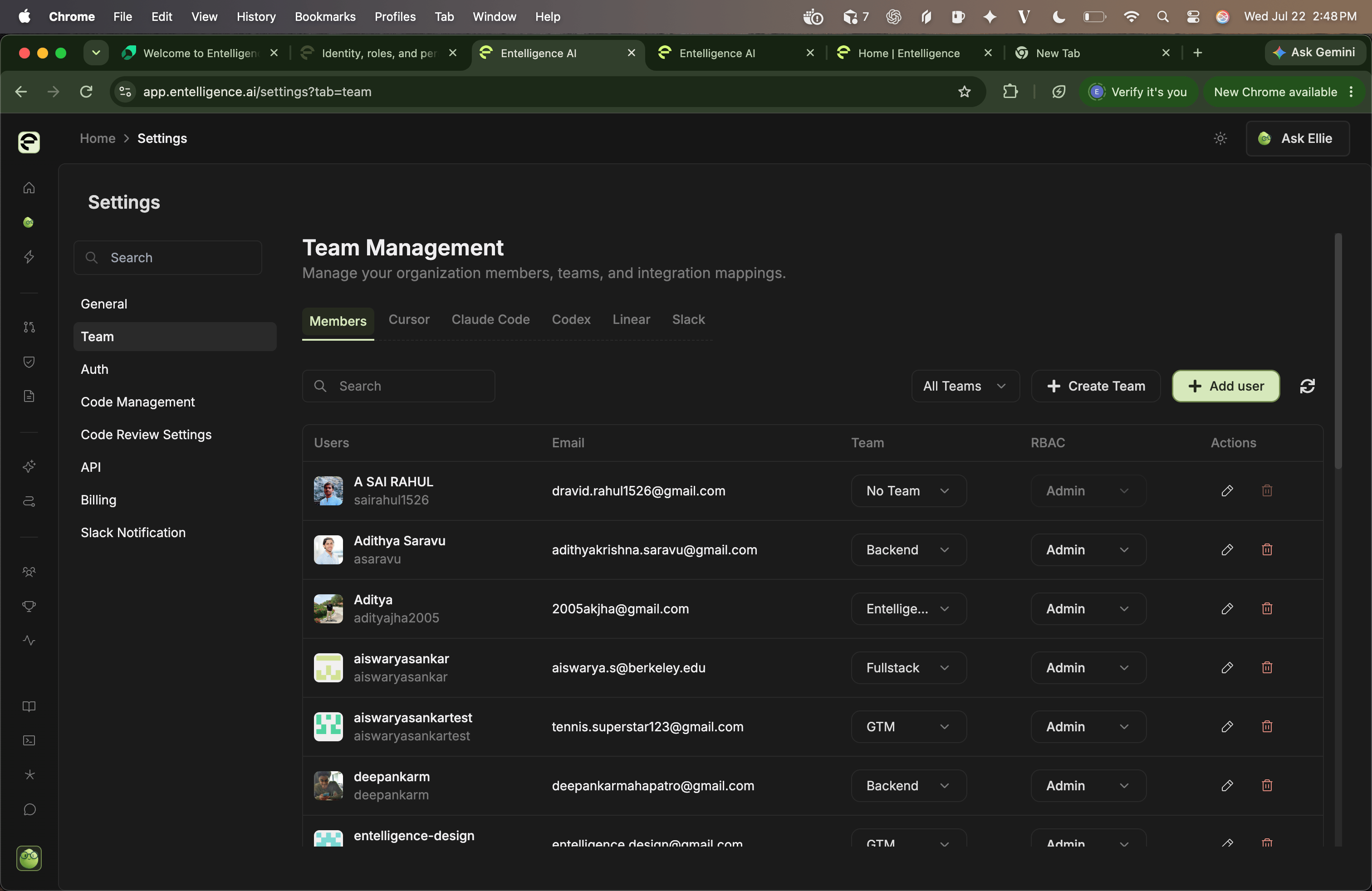 Administrative surfaces include:
* **Settings → Team** for members, teams, credentials, and mappings
* **Settings → Auth** for source-control authentication
* **Settings → Code Management** for repositories
* **Settings → Code Review Settings** for review behavior and context
* **Settings → API** for CLI and MCP keys
* **Settings → Billing**
* **Settings → Slack Notification**
A role label does not establish every task permission. Test important actions with a pilot Member account.
## Permission layers
1. Entelligence workspace membership
2. Member or Admin role
3. Connected-provider authorization
4. Repository, organization, team, project, channel, or service scope
5. Identity and resource mappings
6. Product-level configuration
7. Confirmation or approval for a write
8. Provider-side policy
## High-risk actions
Limit, assign an owner, and test:
* Inviting Admins or sharing an Admin invite link
* Creating, rotating, or deleting API keys
* Saving or replacing provider credentials
* Expanding repository or organization scope
* Enabling cross-repository context
* Approving pull requests or triggering fixes
* Creating automations with external writes
* Purchasing credits or enabling auto top-up
* Removing members, repositories, connectors, mappings, or data
## SSO, SCIM, MFA, and sessions
The audited settings UI does not expose self-service SSO/SAML, SCIM, domain enforcement, or session-policy controls. If required, confirm the purchased capability and operating procedure with Entelligence before documenting it as available.
Confirm:
* Supported identity provider and protocol
* Domain verification and enforcement
* Break-glass access
* JIT provisioning
* Group-to-role mapping
* SCIM create, update, suspend, and delete behavior
* MFA interaction
* Session lifetime and revocation
* Audit events and export
## Offboarding exercise
1. Identify owned keys, provider credentials, teams, mappings, automations, and billing responsibilities.
2. Transfer ownership.
3. Disable the member and remove external mappings.
4. Revoke or rotate shared credentials where needed.
5. Verify workspace and provider access stops.
6. Confirm Slack and automation delivery behavior.
7. Record the treatment of historical analytics.
## Next step
Use [members and roles](/administration/members), [provider mappings](/administration/mappings), and [API keys](/administration/api-keys).
Administrative surfaces include:
* **Settings → Team** for members, teams, credentials, and mappings
* **Settings → Auth** for source-control authentication
* **Settings → Code Management** for repositories
* **Settings → Code Review Settings** for review behavior and context
* **Settings → API** for CLI and MCP keys
* **Settings → Billing**
* **Settings → Slack Notification**
A role label does not establish every task permission. Test important actions with a pilot Member account.
## Permission layers
1. Entelligence workspace membership
2. Member or Admin role
3. Connected-provider authorization
4. Repository, organization, team, project, channel, or service scope
5. Identity and resource mappings
6. Product-level configuration
7. Confirmation or approval for a write
8. Provider-side policy
## High-risk actions
Limit, assign an owner, and test:
* Inviting Admins or sharing an Admin invite link
* Creating, rotating, or deleting API keys
* Saving or replacing provider credentials
* Expanding repository or organization scope
* Enabling cross-repository context
* Approving pull requests or triggering fixes
* Creating automations with external writes
* Purchasing credits or enabling auto top-up
* Removing members, repositories, connectors, mappings, or data
## SSO, SCIM, MFA, and sessions
The audited settings UI does not expose self-service SSO/SAML, SCIM, domain enforcement, or session-policy controls. If required, confirm the purchased capability and operating procedure with Entelligence before documenting it as available.
Confirm:
* Supported identity provider and protocol
* Domain verification and enforcement
* Break-glass access
* JIT provisioning
* Group-to-role mapping
* SCIM create, update, suspend, and delete behavior
* MFA interaction
* Session lifetime and revocation
* Audit events and export
## Offboarding exercise
1. Identify owned keys, provider credentials, teams, mappings, automations, and billing responsibilities.
2. Transfer ownership.
3. Disable the member and remove external mappings.
4. Revoke or rotate shared credentials where needed.
5. Verify workspace and provider access stops.
6. Confirm Slack and automation delivery behavior.
7. Record the treatment of historical analytics.
## Next step
Use [members and roles](/administration/members), [provider mappings](/administration/mappings), and [API keys](/administration/api-keys).